The Top 13 Safety Apps for Parents in 2026
The online world our kids are growing up in has changed fast. According to Australia’s eSafety Commissioner, 96% of children aged 10 to 15 have used social media, almost 3 in 4 have already seen content associated with online harm, and more than half have experienced cyberbullying.
There’s been a major change to the rules, too. From December 2025, social media platforms must take reasonable steps to stop under-16s in Australia from holding accounts — and importantly, there are no penalties for parents or their kids.
That's not necessarily a bad thing. There are many benefits to kids having phones. But it's essential to take advantage of safety apps that will ensure your kids are using their phones safely. Do you want to know some of the top safety websites and apps for parents? Keep reading to find out what they are!
Updated for 2026 — our current top picks. A few of the apps in the original list below have since closed or changed, so if you just want the short version, these are the tools we’d recommend first today:
Bark — real-time AI alerts for bullying, predators and risky content across texts, email and social apps.
Qustodio — the best all-rounder for web filtering, app blocking and screen-time limits.
Google Family Link — free parental controls for Android phones and Chromebooks.
Apple Screen Time — free content and time limits built into every iPhone and iPad.
Aura — parental controls plus whole-family scam, spam and identity protection.
Canopy — blocks explicit images in real time and helps protect against sextortion.
Norton Family — web supervision and time limits, great for guided conversations.
Life360 — family location sharing and place alerts.
Benefits of Kids Having Cell Phones
Before we go over some of the best apps for parents, we want to reiterate that there's nothing wrong with your kids having phones. So don't feel guilty if they do!
Many homes don't have landlines anymore, and every person in a household needs to have a phone to use, especially in the event of an emergency.
Plus, with a smartphone, kids have access to a wealth of knowledge and educational materials that can complement their curriculum and learning. They're also entertaining, and they've become an integral part of our world. Children under the age of 7 learn languages rapidly. Some of them are even learning how to code!
If your kids have phones, iPads, or computers, there are enough family safety apps to make sure they're staying guarded and using their devices wisely. That being said this is my list of the top 13 apps which will help you navigate 2026 safer!
1. The MamaBear App Will Tell You Where They Are
With today's technology, there's no reason not to know exactly where your loved ones are at all times, especially when it comes to your kids.As parents, we want to know our kids are safe, especially when they aren't with us. With the MamaBear app, you can set up alerts concerning location activity. It'll allow you to give them some freedom without having to call or text and check in on them constantly. You'll have no shortage of peace of mind when using this app!
2. My Mobile Watchdog and OurPact Do It All
It's the job of parents to protect their children. And there's nothing wrong with taking any precautions necessary to do so. My Mobile Watchdog app allows you to know the location of your child at all times. Plus, you can see their text messages and call logs through the app's dashboard.You can remove or block any apps if you see fit, and alert yourself of any unapproved communication. It also gives you the power to delete or allow contacts too. OurPact does do it all. You can locate family members, manage screen time, block apps and websites, and stay connected at all times with it's advanced technology.
3. Screen Time Won't Allow Your Kids to Spend Hours Online
Kids will spend hours online or playing games when they aren't monitored. And hours of screen time every day isn't good for anyone, let alone a growing person. With the Screen Time app, you can set time limits during school or any other time of the day. Plus, you can restrict access to certain apps during specific times. You can even pause your kid's device from your phone or grant them a bonus time.
4. Moment Family Reminds You to Stop and Smell the Flowers
When you were a kid, did anyone ever tell you how crucial it is to stop and smell the flowers once in a while? But a busy family doesn't always get the chance to allow those moments to happen naturally. With Moment Family, you can monitor your whole family's screens from the security of your phone. You can schedule special moments and valuable time for you and your family to be screen-free. Even if it's only 1 or 2 dinners a week, that is much better than no family dinners at all!
5. With Circle, You Set the Rules
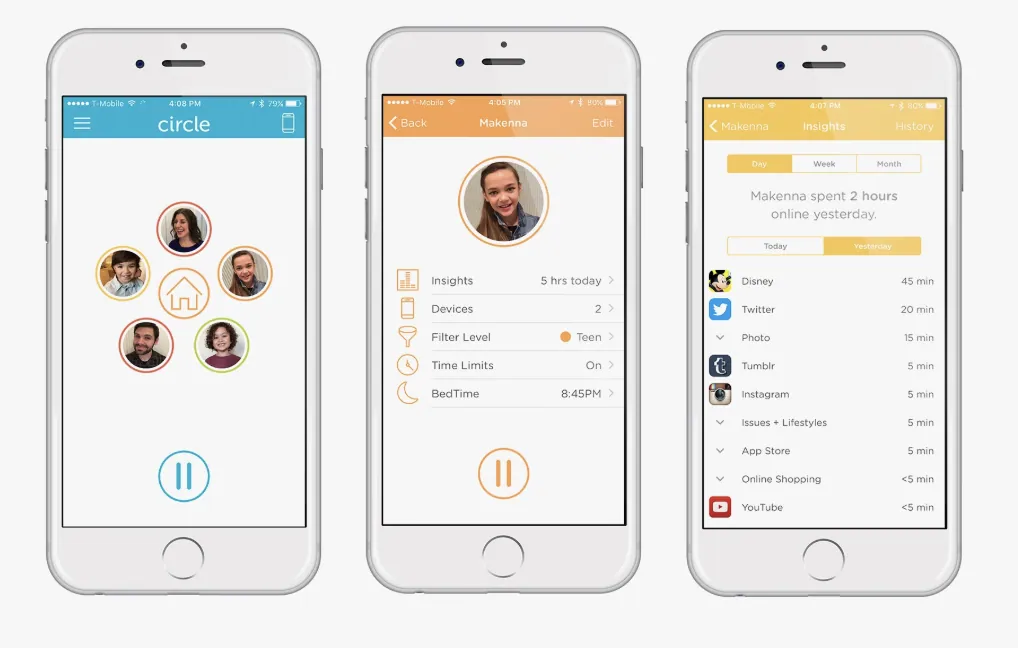
Circle allows you to watch over game consoles, smart TVs, tablets, and more! You'll have the ability to set your own limits across every device and filter all content. Their "Home Plus" package connects to your wifi router and enables you to use the app to monitor devices, wherever they are.
6. Pumpic Even Controls Skype
Pumpic is an amazing parental monitoring app. You can provide control over communication like WhatsApp or Skype, which many other parental apps cannot do. With Pumpic, you can also track calls, photos, website visits, contacts, and text messages. You have control over what gets downloaded to your child's device. You can even lock and wipe the device remotely or monitor chats and social media.
7. LastPass Protects Your Family's Passwords
Do you ever find yourself scrambling to find the piece of paper on which you scribbled down a password? Do you keep all your passwords on your phone but often wonder if they're secure? LastPass enables you to keep all your family's passwords safe. With LastPass, you can say goodbye to the days of forgotten passwords and a constant need to reset.
8. Life360
Brings Your Family TogetherLife360 gives your entire family a private circle that's built specifically for your family's needs. The location sharing aspect provides anyone in the circle to check on anyone else's recent or current whereabouts.You can set up alerts to let you know if anyone's battery is running low, and notifications that'll alert you when family members visit certain places.Plus, Life360's crash protection feature protects drivers and passengers by alerting emergency contacts and sending an ambulance in the event of a crash.
9 . Hiya
Manages Phone Calls and Contacts
When you have the Hiya app, you get to always know who's calling, even if they aren't already a contact in your phone. Plus, you can choose which numbers to block and enable spam alerts to make sure you only ever take a call from someone who matters. You can use it on all the phones in the family!
10. TeenSafe
Keeps Your Teens SafeAs much as younger children need supervision while perusing YouTube, your teens need guidance when they text. Did you know that almost 75% of teens ages 12 to 17 get bullied? 59% of those teens reported being harassed or bullied online.
With TeenSafe, you can view received, sent, and even deleted text messages.Plus, you'll be able to view your teen's activity on social media apps. It also teaches good driving habits by forcing them to keep their eyes on the road.In addition, it prevents distractions from noises and clicks from your child's phone. Plus, it only allows them to send and receive calls while driving.
11. Family Link
Creates Healthy Digital Habits for Your Family. Google's Family Link for parents allows you to control apps from Google. It will enable you to set ground rules across all digital devices and accounts. You can do anything remotely from your phone and thus guide your kids as they begin to play, learn, read, and explore online.
12. Net Nanny Won an Editor's Choice Award
With Net Nanny, you can truly prevent your child from viewing harmful content because it blocks dangerous content BEFORE your child gets the chance to see it. You can control your child's internet usage with social media monitoring, filtering options, and time management features.
Plus, it gives you remote admin access, which means you can change profile settings or view reports, as long as you have an internet connection.
Net Nanny's new "Family Feed" provides visibility to apps used by your children, and real-time alerts on suicide, weapons, drug-related content, and porn.It also provides instant reporting of your child's online searches.It won an editor's choice award for "best parental control app."
13. ReThink Fights Bullying
Bullying impacts 1 in 5 United States kids. And only 39% of high school students opt to tell someone they're being bullied. Plus, there are so many different types of bullying!
The ReThink app encourages users to stop and think before they send a message. It was created by a teenager, and it detects and stops bullying before it happens! The website reveals that over 90% of kids who use ReThink change their minds about sending a harmful text.
Safety Apps Benefit the Whole Family
As parents, it's essential to be aware of the digital world in which we live. But we don't have to be burdened or worried by the idea of our kids using technology. When you incorporate awareness and relevant safety apps into the lives of your family members, you'll ensure that the internet and other aspects of a device are being used correctly and safely.
Do you want to help impact your child's school by providing expertise concerning bullying, internet safety, resilience, and social skills?
Contact us today so that we can help!
 Jonny Shannon
Australia's Youth Speaker of the Year. Cybersafety, bullying, mental health & resilience talks for schools, staff and parents.
Jonny's Cyber Safety talk shows students how to protect their privacy, reputation and wellbeing online — practical, current and high-energy.